Puninus: A Complete Google Slides Toolkit for Modern Brands
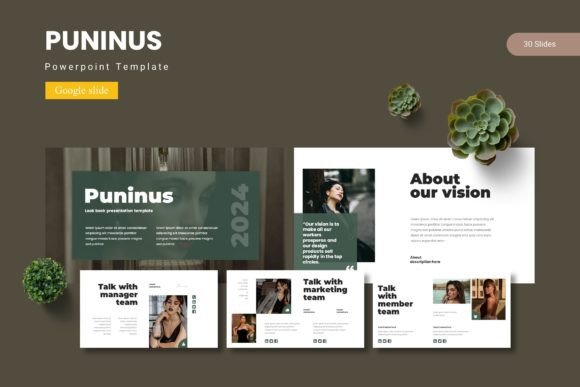
Every professional, from the freelance designer juggling multiple clients to the startup founder bootstrapping their first pitch deck, eventually hits the same wall. You have a brilliant idea, a solid business plan, or a groundbreaking service, but when it comes time to present it visually, the tools feel limiting. Standard slide decks often look generic, and spending hours wrestling with alignment and color palettes is a drain on productivity. This is where the Puninus - Google Slide Template steps in, not just as a file you download, but as a comprehensive visual system designed to bridge the gap between a rough concept and a polished presentation.
Why Visual Consistency Matters More Than Ever
In the current digital landscape, attention spans are short, and competition is fierce. Whether you are a content creator trying to grow a following or a small business owner pitching to investors, visual consistency is the currency of trust. When your slides look disjointed—using clashing fonts or inconsistent imagery—it distracts from your message. Puninus addresses this by offering a cohesive design language that ensures every slide feels like it belongs to the same story.
The value of a premium template lies in its ability to act as a design asset that saves you time while elevating your output. With Puninus, you aren't just getting a single presentation; you are getting a toolkit. The package includes over 150 total slides spread across five premade color schemes. This variety allows you to adapt the same core message to different audiences or brand phases without starting from scratch. For a marketing professional, this means you can maintain brand recognition across different campaigns simply by toggling between the color variations provided.
Practical Applications for Creators and Businesses
It is easy to look at a slide template and only see a tool for quarterly business reviews. However, the utility of the Puninus - Google Slide Template extends far beyond the boardroom. For graphic designers, the pixel-perfect illustrations and handcrafted infographics serve as a starting point for social media graphics or digital product mockups. The "drag and drop" picture placeholders are particularly useful here; you can quickly swap out stock photos for client imagery, ensuring the presentation feels custom-tailored rather than templated.
Consider the needs of a blogger or a creative entrepreneur. You might need to create a media kit to send to brands for sponsorship opportunities. Instead of sending a static PDF, a visually appealing slide deck that showcases your analytics, past work, and brand aesthetic can make a powerful impression. The Gallery and Portfolio slides included in this template are specifically designed for this purpose. They allow you to showcase high-resolution images of your merchandise, packaging design, or editorial layouts without cluttering the screen with too much text.
Furthermore, if you are involved in packaging design or product launches, you can use the section break slides to distinctively separate different aspects of your proposal. For instance, you could use one color scheme for the "Market Analysis" section and a variation for the "Product Showcase." This visual rhythm helps keep your audience engaged and makes complex information easier to digest.
Mastering the Design Elements
A key feature of the Puninus template is its reliance on Master Slides. For those less familiar with the technical side of presentation software, this is a game-changer. Instead of manually editing every single page, changes made to the master slide are reflected throughout the entire deck. This ensures that if you decide to change your corporate font or adjust the logo placement, you don't have to spend an hour fixing every individual slide. It is a massive time-saver that enforces that visual consistency we discussed earlier.
The illustrations included are not just static images; they are resizable and editable vectors. This is crucial for modern typography and design flexibility. If you are working on a branding project, you might need to adjust the color of an icon to match a specific hex code in a client’s brand identity guide. Because the graphics are editable, you have full control over these elements. This level of customization is usually reserved for high-end design software, but Puninus brings it into the accessible realm of Google Slides.
Typography and Readability Considerations
While the visual elements are striking, the text is what carries the narrative. The Puninus template is built with readability in mind. When using any presentation deck, choosing the right font style is paramount. The template is designed to accommodate clean, legible text that works well on both large projector screens and small mobile devices. This is essential for content creators who share their slide decks as downloadable resources or for marketers sending proposals via email.
When working with a template like this, practical advice on typography is to keep it simple. Avoid the temptation to over-decorate your text with shadows or outlines. Let the structure of the slide do the heavy lifting. The layout provides ample whitespace, which is a designer’s best friend. It allows your audience's eyes to rest and focuses their attention on the key points. Whether you are writing a script for a speech or outlining a blog post structure, the text boxes are arranged to prioritize clarity.
Streamlining Your Workflow
For the busy entrepreneur or the freelance designer, efficiency is key. The Puninus - Google Slide Template comes with a clear "Readme First" document that details font and photo information. This is a small but vital detail. It saves you the headache of guessing which typeface was used or where to find the specific stock images featured in the preview. It demonstrates a professional approach to asset management, ensuring you can get up and running immediately.
The fact that this is a Google Slides item, rather than just a PowerPoint file, adds another layer of collaboration. Multiple team members can work on the presentation simultaneously. A brand strategist can refine the copy while a graphic designer fine-tunes the visual assets, all in real-time. This collaborative potential makes it an ideal tool for remote teams or for designers working closely with clients who want to be involved in the creation process.
Ultimately, the Puninus template is about removing friction from the creative process. It provides a robust framework—complete with section breaks, infographics, and portfolio slides—so that you can focus on what matters most: your message. Whether you are designing a pitch deck for a new startup, creating a visual guide for a workshop, or assembling a portfolio to attract new clients, having a versatile and professional toolkit at your disposal changes the way you approach visual communication. It transforms a mundane task into an opportunity to reinforce your brand and engage your audience with confidence.